



Scrubkit
Point at a folder, get a clean table of file text + metadata back — fully offline. Local-first data preparation for RAG and search pipelines, on .NET 8 and .NET Standard 2.0.
scrubkit — folder extraction
$ dotnet add package Scrubkit
scanning ./Docs …
handbook.pdf Document · 48 KB
budget.xlsx Spreadsheet · 12 KB
warn: team-photo.jpg → EXIF only
✓ clean table returned
~12K
files/sec extracted
99%+
covered · 480+ tests
100%
offline · no telemetry
12
NuGet packages
3
target frameworks
net10.0 · net8.0 · netstandard2.0
MPL-2.0
open source
Throughput from a BenchmarkDotNet run over a mixed text-file corpus, 4-way parallel — regenerate it from benchmarks/. Coverage is gated in CI at a 99% line floor (currently ~99.8%).
Offline
No network calls, no telemetry. Everything runs locally on your infrastructure for maximum privacy.
Fast Core
Extraction for PDF, Office, and text via PdfPig + MetadataExtractor — a small dependency set and streaming, bounded-parallel processing.
Pluggable
Add or override formats via IFileExtractor. Opt into text transforms — redaction, masking — with an IRedactor you supply.
Robust
A single unreadable file never crashes the batch. Problems surface as warnings on the specific row.
GET STARTED
Simple Installation
Add Scrubkit to your .NET project with a single command. Multi-targeted for net10.0, net8.0, and netstandard2.0.
NO CODE? USE THE CLI
Run it from a shell
The scrubkit dotnet tool scans a folder, redacts PII + secrets, and writes CSV / JSON / JSON Lines / Parquet — from any shell or CI, no code. Table to stdout, summary to stderr.
$ dotnet tool install --global Scrubkit.Tool

# extract → CSV on stdout
$ scrubkit scan ./docs

# scrub PII + secrets → JSON Lines, ready to embed
$ scrubkit scan ./repo --redact --format jsonl --out docs.jsonl

# widest net, only PDFs and email
$ scrubkit scan ./data --redact=aggressive --include .pdf,.eml
In CI? Copy the sample GitHub Action to produce a scrubbed corpus artifact — or fail a build if secrets would leak.
Quick Start
Get up and running in a few lines. Point FolderScrubber at a directory and await one flat table of results.
using Scrubkit;

var scrubber = new FolderScrubber(new ReadOptions {
    Recursion = Recursion.AllNested
});

IReadOnlyList<FileRecord> table = await scrubber.ReadAsync(@"C:\Docs");
Recipe: Prepare for RAG
Stream document folders straight into a vector store. The async stream API keeps the memory footprint low even on massive directories.
- check_circle Text + metadata ready to embed
-
check_circle
Chunker→ overlapping windows + JSON Lines - check_circle Streaming, order-preserving I/O
var scrubber = new FolderScrubber(new ReadOptions
{
    MaxTextLength = 8_000,   // keep chunks index-friendly
});

await foreach (var doc in scrubber.ReadStreamAsync(@"C:\Docs"))
{
    if (doc.Text.Length == 0) continue;

    await index.UpsertAsync(
        id: doc.Path,
        text: doc.Text,
        metadata: doc.Metadata);
}
One core, a growing family of add-ons
Start with the core package — it reads PDF, Office, text, and image EXIF out of the box.
Reach for an optional add-on when you need more formats. Every add-on references only
Scrubkit.Abstractions, so it stays lightweight and pulls in no heavy dependencies.
Want it all in one reference? Grab Scrubkit.All.
Scrubkit
The engine — FolderScrubber with built-in PDF, Office, text, and image-EXIF extractors. Everything most projects need.

Scrubkit.All
One reference that pulls in the whole family — core, every extractor add-on, DI, Microsoft.Extensions.AI, Semantic Kernel, and (on net8.0/net10.0) Parquet. Install this to read everything out of the box.

Scrubkit.Abstractions
Dependency-free contracts — IFileExtractor, FileRecord, ReadOptions. Reference this to author your own add-on.

Scrubkit.Email
.eml (MIME) email — headers become metadata, the body becomes text. Multipart, base64, and quoted-printable aware.

Scrubkit.OpenDocument
OpenDocument .odt / .ods / .odp from LibreOffice / OpenOffice — body text plus Title, Author, and Subject.

Scrubkit.Epub
.epub e-books — the book's text (XHTML spine, tags stripped) plus Title, Author, and Subject. Zero-dependency, like the other add-ons.

Scrubkit.LegacyOffice
Pre-2007 binary Office — .doc / .xls / .ppt — read straight from the OLE2 compound file with the BCL. Body text plus Title, Author, and Subject. No NPOI, no interop.

Scrubkit.Extensions.DependencyInjection
services.AddScrubkit(…) registers a configured FolderScrubber for ASP.NET Core and worker hosts — idiomatic Microsoft.Extensions.DependencyInjection.

Scrubkit.Extensions.MicrosoftExtensionsAI
Offline PII and secret redaction middleware for Microsoft.Extensions.AI — RedactingChatClient and RedactingEmbeddingGenerator.

Scrubkit.Extensions.SemanticKernel
Extensions to scan, redact, chunk, and index folder contents directly into ISemanticTextMemory and modern IVectorStoreRecordCollection stores.

Scrubkit.Parquet
Write the record table to Apache Parquet for data-lake / analytics ingestion (Parquet.Net). CSV & JSON stay zero-dependency in the core; this one requires a modern .NET TFM (net8.0 / net10.0).

Scrubkit.Tool
The scrubkit command-line tool (dotnet tool install -g Scrubkit.Tool) — scrubkit scan <folder> extracts, redacts PII + secrets, and writes CSV / JSON / JSON Lines / Parquet from any shell or CI.

Writing your own? Implement IFileExtractor, reference
Scrubkit.Abstractions, and register it via ReadOptions.Extractors —
it's tried before the built-ins, so you can add or override any format.
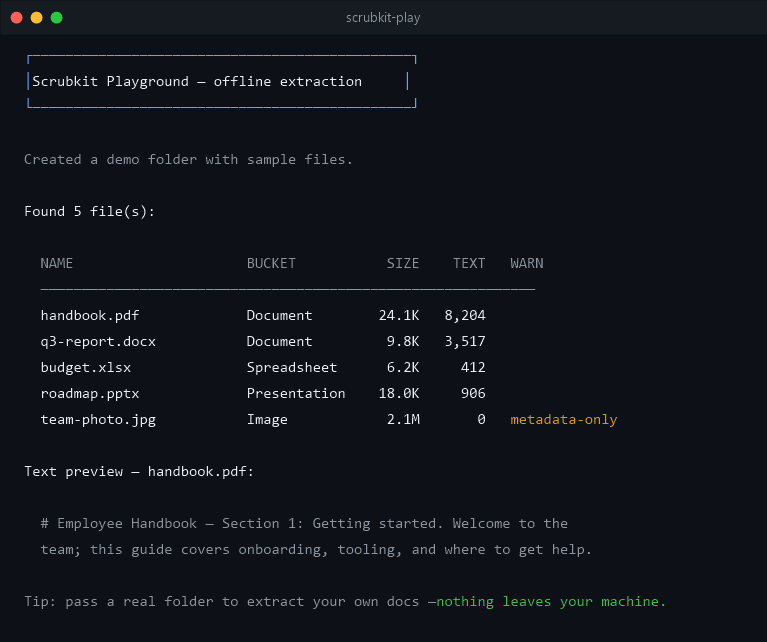
Try Without Installing
Run the playground demo to see the table output format immediately.
Repository Layout
Privacy & disclaimer
Private by design
100% offline. No network calls, no telemetry, no accounts — your files and their contents never leave your process. Scrubkit is safe for air-gapped and regulated environments; the offline guarantee is enforced by a test that fails the build if either shipping assembly references a networking API.
Disclaimer
Scrubkit is provided as-is under the MPL-2.0, with no warranty. Its redaction is best-effort pattern matching: it reduces incidental exposure of common sensitive values but will miss things — it is not a compliance tool or a guarantee. Validate suitability for your own use before relying on it.
jjopensoftworks-blip Ecosystem
Explore open-source .NET libraries and developer tools built and maintained by jjopensoftworks-blip. High-performance, offline-first, and designed for modern software engineering.
ShreePdf
Fluent PDF Generation & Layout Engine for .NET
A high-performance, fluent C# PDF creation engine for generating invoices, reports, documents, and dynamic layouts with zero external heavy dependencies. Built for .NET Standard & modern .NET runtimes.
Scrubkit
Offline Text & Metadata Extraction for RAG & Search
Walk any directory and convert raw PDF, Office, TXT, EXIF, and Email files into clean data tables with opt-in pattern redaction. Zero telemetry, 100% offline.
More Open-Source .NET Packages Coming Soon
We are actively expanding our developer ecosystem. Have a specific library or tool request?
Built by jjopensoftworks-blip
Need a hand on a project, or want a custom extractor or integration?
Scrubkit is built and maintained by jjopensoftworks-blip. We also build web apps, cloud & DevOps, desktop, and mobile (Android/iOS) software — need a hand on a project, or want a custom extractor or integration? We'd love to hear from you.